powered by Roomy

Sunday, September 26, 2010

Call any mobile in world for free for unlimited minutes unlimited times free

This message is specially for those who were not able to make the free call via yahoo messenger.
Things you will need to make a free call:
1. Updated Flash player for your browser, you can update it free from adobe site at http://get.adobe.com/flashplayer/
2. Firefox, Chrome, or Internet Explorer Browser.
3. Headphone with mic.  (see our article on how to use headphone as mic)


Steps to make a FREE call to any number in the world
Step1.  Go to website http://evaphone.com/ and wait for the dialer to load.  Enter the mobile number with its country code and hit the green dial button.

Step2.  Allow the application to access your microphone.
Step3.  See the short video advertisement.
Step4.  Hear the dial ring and wait for your friend to attend the call.
Step5.  Talk to your friend 100% free.

Call any mobile in world for free for unlimited minutes unlimited times


What all you will need:
Google ID
Hotshield
Rebtel Account
IPKall number
SIP Call number
Express Talk
Headphone with Microphone

Step1:  Note Update:  As you must be aware that Google Voice has become Open now onwards, and there is no need to request an invitation, so now you just got to install Hotshield to protect your IP address, to download hotspot shield go to the following link  http://www.anchorfree.com/downloads/hotspot-shield/ and install it.
Then signup to Google Voice Account. 

Step2:  Go to the TPAD website to obtain a Free SIP number, signup at https://secure.tpad.com/signup/
Note down your TPAD number somewhere.

Step3:  Once you obtained the free SIP number from TPAD, go to the following website http://phone.ipkall.com/
Signup to this website and write the following during the signup form:
1. Choose your account type:  select SIP
2. Choose area code for your IP call number:  default 253
3. SIP Phone number:  your TPAD SIP number here.
4. SIP Proxy number:  sip.tpad.com
5. email address:  your email address here
6. password: anything combination of words and number
7. Enter captcha image two words in the box.

Step4: Check your email, you must have a Washington State's free phone number for your IP phone.  Note that number at some notepad or keep it handy.


Step5:  Now download Express Talk and set up your SIP information as per the instrutions below:
How to Install the Express Talk Softphone


How to setup Tpad on the easy to use Express Talk Softphone (Basic Edition).

This is a very good softphone and very simple to setup and has a number of great wizards (audio / network).
Also, use this if you are getting Timeout / Failed to connect / One way audio problems.

How to setup Free Express Talk Softphone (Basic Edition) with Tpad

1. Download from http://www.nch.com.au/talk/index.html (Basic Edition)

(Compatible with Windows 98/ME/2000/XP/2003/Vista or later)

2. Install and follow simple setup guides.

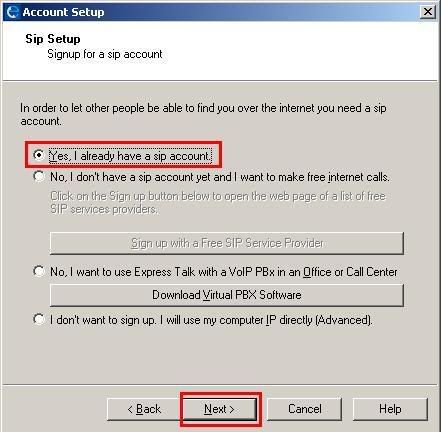
3. When this screen appears, select "Yes, I already have SIP Account" and then NEXT.


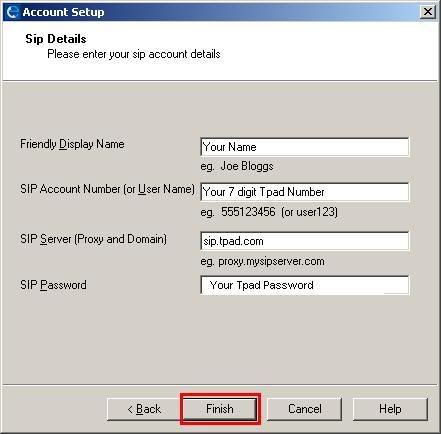
4. Then when this screen appears enter


Your Name: Enter you display name


SIP Account Number: Your 7 digit Tpad Number e.g 1126789

SIP Server: sipx.tpad.com

SIP Password: Your Tpad Password (used when you made an account)

Then click FINISH.
How to make Free Tpad to Tpad (IP to IP / VoIP to VoIP)
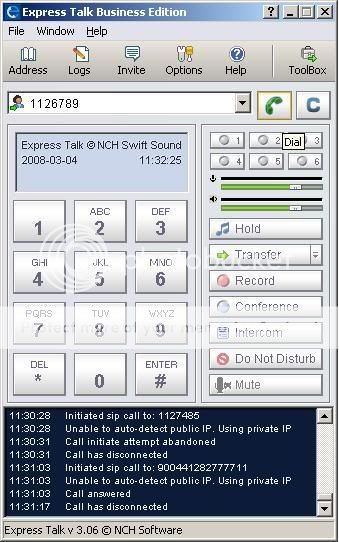
Just dial the 7 digit Tpad Number of your friend, anywhere in the World and press the Green Call Button.
Attach your microphone and headset with your computer and make the free call to 121 to test your setup is working fine.

Step6:  Now go to your Google Voice invitation, and set up your account to obtain a Google Voice Number, when asked for a local telephone number to receive the verification call, then provide your IPKall Washington local number, and click Call Me Now.

You will receive a call on your computer at Express Talk, receive the call and enter the two digit code to verify your number, thats great now you have activated your Google Voice Account Congratulation. Note down your google voice number

Step7:  Now the final step to make international calls for free, go and signup to Rebtel https://www.rebtel.com/en/Utility-Pages/Join-flow/Join/
Enter the following in the form:
First Name:  Your name
Second Name: Your last name
email:  Your email
Country:  USA
your phone number:  Enter your Google Voice number enter +1 for america's code
chose pin:  enter any 4 digit numerical number

Step8: Now add any of your friends mobile number in your Rebtel account to get a local number of washington.  Did not got me, look what Rebtel does is provide you a local number of washington in place of any international number, so that when users call local number, they get to talk to international numbers at cost of local numbers, and calling local numbers of washington is free via Google Voice, so when you make a call via google voice to the local number (which is your friend's international number) you get to talk to your friends for free.  Now add your friend's number with internatioal code ie. +919xxxxxxx and obtain and note the local number that should be like 7xxxxx.

Step9:  Add this local number in the contact of your Google Voice and click the call button, you will receive an incoming call at Express Talk, receive the call, then you will here the dialing ring to your friend, when your friend receives the call, then you are up and ready to call him.

Note:  Do not misuse this service, just think of it as a mean to be in connect with your loved ones and enjoy the free call

Sunday, August 29, 2010

how to get pc at low cost

Ready to buy a computer but really don’t know where to start, just sit back and relax, this page is going to tell you all you need know to get the best buy Computer.

Let’s understand the factors that you need to look into to buy a Computer:

First thing for deciding your Best Buy Computer is - How you are going to use your Computer?:

Some of the basic usage for computers [There are a lot more areas in which computers are used, this list is just to enable you to factor the right computer based on your requirements]:
You are going to use it for checking emails, browsing the internet, chatting, online-dating, etc.
You are going to use it for running software for your office or business and will be using it for applications like Microsoft Word, Excel, Powerpoint, Project, Outlook, Lotus Notes, etc.
You are going to use it for playing games.
You are buying a Computer for developing software applications.


If you are buying a Computer for the first two reasons and it is your first Computer then its best that you buy the “Standard Specification” that is available in the market in your country.

Standard specification is the 'in' thing in the market, the market is going to be flooded with these computers, hence the cost of this specification will be low. But if you want to buy a good computer that you can use for home, work and play then it would be worth while to understand what goes into defining a Computer Specification.

Next thing for deciding your Best Buy Computer is - How much is your Budget? Budget is the next deciding factor as to how good each of the components will be on your Computer.

Let’s dive in and see how you can define the Computer Specification that’s best for you and balance it with the budget you have.

Lets understand some basics about Computers, any computer you buy will have the following components:
Central Processing Unit (CPU)
Motherboard
Computer Memory (RAM)
Hard drive
DVD / CD Drive
Video Card
Sound Card
External Connectors (USB, COM Ports, LPT Ports)
Keyboard
Monitor
Mouse
Speakers
Network Card
Wi-Fi
Modem
Printer
Scanner
Bluetooth
Operating System
Software

The first 4 components are the major cost drivers for your computer and will contribute to 70% of the cost of the computer, but they are 90% of the factors towards the performance of your machine

Friday, August 13, 2010

GPRS

GPRS protocol is a packet-switch protocol; define for web applications in GSM network. In other words Internet on GSM network is standardized as GPRS network. GPRS has digital structure and this structure based on Time Division Multiple Access (TDMA) technique. One TDMA frame has 8 time slots (TSs). These TSs can be allocated to users, and single TS can be shared by several active users for uplink and downlink purposes. Different coding schemes are used to enhance data rate from 9Kbps to 150 Kbps per user, and it takes 0.5 to 1 second. Security features in GPRS is provided by GSM network.
 GPRS Architecture

Global System for Mobile Communication (GSM) circuit-switch architecture does not support the GPRS packet-switch architecture. Thus, GPRS requires its own network architecture. Several networks and databases e.g. Mobile Station (MS), Base Station Subsystem (BSS), Home Location Register (HLR), Visitor Location Register (VLR) in existing GSM network are modified in GPRS network.

GPRS architecture introduces the following network nodes to GSM architecture.

Serving GPRS Support Node (SGSN)

Gateway GPRS Support Node (GGSN)

Mobile Station (MS)

Base Station System (BSS)

Home Location Register (HLR)

Visitor Location Register (VLR)


1.Serving GPRS Support Node (SGSN): In GPRS network SGSN is equivalent to MSC. Packets of data between MSC and Public Switch Data Network (PSDN) are transferred and received by SGSN.

2.Gateway GPRS Support Node (GGSN): GSM databases e.g. HLR and VLR are supported by GGSN. It also interacts with external packet-switch networks.

3.Mobile Station (MS): In GPRS network MS consists of Mobile Terminal (MT) and Terminal Equipment (TE). A computer attached to MT is called a ME. Through air, MT communicates with the BSS.

4.Base Station System (BSS): In BSS, Base Transceiver Station (BTS) and Base Station Controller (BSC) are modified to support GPRS channel coding schemes BTS is modified while to forward calls to Mobile Switching Centre (MSC) and data to SGSN through Packet Control Unit (PCU), is supported by BSC. One SGSN is served by one BSC.

5.Home Location Register (HLR): In GPRS, HLR contains information about routing. To map an MS to one or more GGSNs, update the SGSN and to store the Internet Protocol (IP) address, this information is accessed by both SGSN and GGSN.

6.Visitor Location Register (VLR): In GPRS. VLR contains the SGSN number and this number indicates the MS currently served by the SGSN.
GPRS Interfaces

Different interfaces are used for routing between network nodes in GPRS.

Um interface provides communication between MS and BSS.

Gb interface provides connection between BSS and SGSN.

Gn interface provides connection between SGSN and GGSN within the same GPRS network.

Gp interface provides connection between SGSN and GGSN when they are in different GPRS network.

Gi interface provides connection between GGSN and external networks.

Gs interface provides communication between MSC and SGSN.
GPRS functional Groups
The functions which are defined in GPRS are following.

Network access function: Point to point data transfer, registration of MS with packet data protocols, radio resources for MS communication and charging information about packet transmission, is provided by this function.

Packet routing and transfer function: Routing of data between an MS and destination, conversion of GPRS address to external address and forwarding of packets between an MS and GGSN, is provided by this function.

Logical link management function: The communication between an MS and the GSM network is maintained by it.

Radio resources management function: Radio communication paths are allocated by it.

Mobility management function: Current location of an MS is kept by it. When an MS is entered to a new area, all routing and location in formations are also updated by it.

Network management function: If provides mechanisms to support network functions related to GPRS.
Advantages
The major advantage of GPRS is that, to access data no dial-up connection is required. It is an inexpensive mobile data service as compared to Short Message Service (SMS) in GSM.

Thursday, August 12, 2010

Follow the list of latest nokia codes list

Code                                                     Action

*#7780#                               To restore the factory settings of mobile set

*#3283#                               To verify the set Manufacturing date

*#746025625#                   To stop the sim clock

*#67705646#                      Use to delete the operator logo

*#73#                                    Use to reset game scores and phone timers

*#0000#                               Use to display the mobile software version

*#06#                                    To display the IMEI Number of the mobile

*#92702689#                      To display the mobile warranty related settings (Serial no, Made,

                                                Purchasing  date, Repaired date, Life time)

*#7760#                                To display the Production serial number

*#bta0#                                 Use to display Bluetooth MAC address

*#9999#                                Use to display the mobile software version

*#147#                                  If you are using Vodafone then this code will help you show the last call detail

*#2640#                               To display the mobile security code

*#7328748263373738#   Apply to resets the set default security code

*#43#                                    To verify the call waiting status

*#2820#                                To verify the Bluetooth information

*#7370#                                To format the mobile phone memory

*#delset#                              To delete the GPRS AND EMAIL settings

#pw+1234567890+1#       To display the lock status of mobile set
#pw+1234567890+4#       To display the lock status of your SIM